8-Page Zine Composer

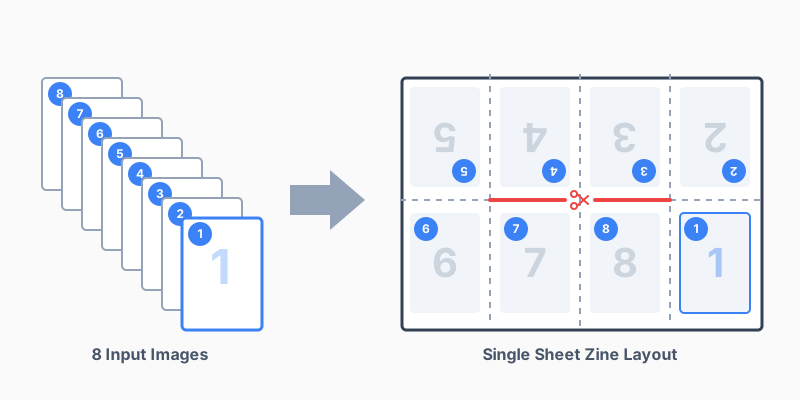
A browser-based tool for creating printable 8-page zines from individual page images. Upload your artwork or photos, and this assembles them into a properly laid-out spread, ready to print, cut, and fold.

Usage

  1. Prepare an image of each page of your zine (photos, digital arts, etc.). They can be files on your computer or photos on your phone's photos app.
  2. Load each of your images using the "browse" buttons below.
  3. Click "Make Zine!".
  4. Click "Download Result". Save the image.
  5. Print it out on standard size printer paper.
  6. Cut and fold (tutorials available on youtube!)
  7. You got a zine! :3

Load Images

Page 1 (Front Cover):
Page 2:
Page 3:
Page 4:
Page 5:
Page 6:
Page 7:
Page 8 (Back Cover):

Scale Option

Auto-scale your images so that they fit in the center of each zine page.

Stretch your images to fill the entire zine page. Part might get cropped off!

Download Result

(On iPhone/iPad: tap and hold the image preview, then choose Save to Photos)